
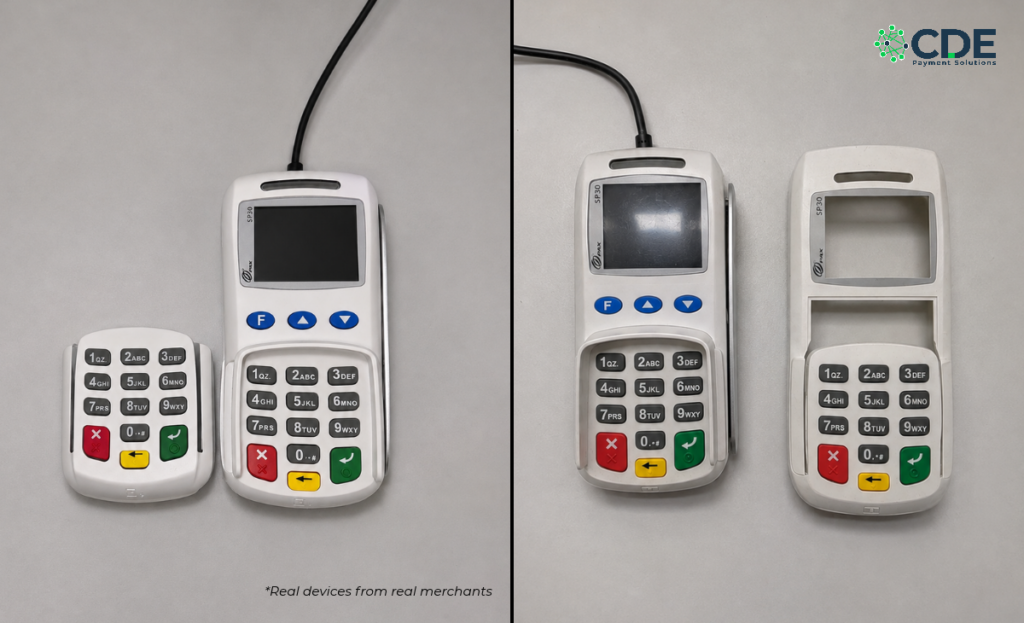
Card skimmers are small, cheap, and fast to install. A criminal can attach one to a payment terminal or PIN pad in less than a minute, often while a clerk is busy with another customer. Once it is in place, it can quietly copy card numbers and PINs from every shopper who pays at your counter.
Skimming is not slowing down. The U.S. Secret Service reported inspecting nearly 60,000 point-of-sale terminals, gas pumps, and ATMs in 2025, and said its operations stopped close to half a billion dollars in potential fraud losses. Small stores with busy counters are a common target.
The best defense is simple: learn how to check for card skimmers and make it part of your daily routine. This guide walks through a 5-minute inspection that works on any terminal or PIN pad, plus a few extra checks depending on the type of device at your counter.
Why It Pays to Check for Card Skimmers Every Day
When a skimmer is found at a store, the damage goes beyond the stolen card data. Customers lose trust, your terminal is taken out of service, and you may need to work with law enforcement while the investigation plays out.
For stores that accept SNAP, the stakes are even higher. Criminals use skimmed EBT card numbers and PINs to steal benefits from families who rely on them for groceries. That is why the USDA Food and Nutrition Administration asks SNAP retailers to inspect their POS machines and PIN pads at least once a day. The Secret Service has also warned that some newer skimmers are built specifically to target EBT cards, because many EBT cards still rely on the magnetic stripe instead of a chip.
A quick daily check costs you almost nothing. Missing a skimmer can cost you your customers.
What Card Skimmers Look Like on a Countertop Terminal
Knowing what you are looking for makes it much easier to check for card skimmers quickly. Most skimmers at a store counter fall into a few categories:
- Overlays. According to the U.S. Secret Service, most point-of-sale skimmers are plastic shells that fit over the top of the terminal, or just over the keypad and chip slot. They are made to look like the real device, so they can be hard to spot at a glance.
- Keypad overlays. A thin fake keypad placed over the real one records every PIN a customer types. Keys may feel spongy, raised, or less responsive than normal.
- Swipe slot inserts. The Secret Service has seen newer skimmers that only cover a small part of the terminal or are hidden inside the side of the device where cards are swiped. These are easy to miss because the rest of the terminal looks normal.
- Chip slot inserts. Some devices slide inside the chip reader. A card that suddenly feels tight, gritty, or hard to insert is a warning sign.
- Hidden cameras. Criminals sometimes hide tiny cameras in items near the terminal, like a charity box or a flyer holder, to record PINs. The USDA recommends keeping the area around your terminal clear for this reason.
- Swapped devices. In some cases, criminals replace a real terminal with a tampered one that looks identical. Checking serial numbers is the best way to catch this.
The 5-Minute Routine to Check for Card Skimmers on Any Terminal
This routine works for every terminal and PIN pad in your store. Do it when you open, and again during shift changes or after your busiest rush.
- Look at it. Compare the terminal to how it normally looks. Watch for extra layers, bulky edges, mismatched colors, gaps, glue, or scratches around the card slot and keypad.
- Pull and lift. Grip the top edges, the card slot, and the keypad and gently pull. Then pick the device up. The USDA recommends doing this multiple times a day. Real terminal parts are solid. Overlays tend to shift, lift, or wiggle.
- Press the keys. Every key should feel firm and click the way it always does. A raised, spongy, or stiff keypad is a red flag.
- Check your marks and seals. Place a sticker, security seal, or small identifying mark on each device. The Secret Service suggests high-visibility security seals on the sides of terminals. If a seal is torn, moved, or covered, something may be on top of it.
- Confirm the serial number. Keep a list of each terminal and PIN pad with its serial number, usually printed on a label on the back or bottom. A serial number that does not match your list could mean the device was swapped.
- Trace the cables. Follow every cable from the device to the wall, router, or terminal. You should recognize every cord and connector. Anything extra, unplugged, or rerouted needs a closer look.
- Scan the area. Look for anything new near the terminal that could hide a camera and make sure your security cameras still have a clear view of the checkout.
Keep a simple log of each check with the date, time, and who did it. A log helps you spot changes over time and shows your team that the routine matters.
A Few Extra Checks by Terminal Type
The routine above works on every device, but a few spots deserve extra attention depending on your setup. Not sure which type you have? See our Smart Terminals page.
- Countertop terminals. Pay close attention to the swipe reader along the side, since side-slot skimmers are a known threat to EBT cards. Check the cables plugged into the back as well.
- Terminals with a separate PIN pad. Customers handle the PIN pad directly, so give it the same pull-and-lift check as the main terminal. Follow its cable all the way back and keep both serial numbers on your list.
- Handheld terminals. With no external cables, there are fewer places to tamper, but a handheld is the easiest device to walk off with or swap. Keep it in sight, store it securely at closing, and confirm the serial number often. Since customers enter their PIN on the screen, also look for any film or overlay on the display.
What to Do If You Find a Card Skimmer
If you spot a skimmer or see signs that a terminal has been tampered with, act right away:
- Stop using the device. Take it out of service immediately so no more cards are compromised.
- Do not remove the skimmer yourself. Leave it in place so law enforcement can handle it as evidence.
- Call your local police. The Secret Service recommends contacting local law enforcement, who can retrieve the device.
- Contact CDE support. Let us know right away at 877-418-7957 so we can help you get back up and running and replace the device if needed.
- Report EBT-related skimming. SNAP retailers should also call the USDA Office of Inspector General Hotline at (202) 690-1622.
- Save your footage. Keep any security camera video from the checkout area to share with investigators.
Habits That Make Skimming Harder
Daily inspections work best alongside a few store habits that make your counter a harder target:
- Never allow unscheduled service visits. The USDA advises retailers to check with their equipment provider before letting anyone touch a terminal. If someone shows up claiming to be from CDE without an appointment, call us before handing over any device.
- Train every employee. Seasonal and part-time staff should know how to check for card skimmers and who to tell if something looks off.
- Keep terminals in view. Position terminals where staff and cameras can see them and lock up handheld devices at closing.
- Encourage tap and chip payments. Contactless and chip transactions are harder to copy than a magnetic stripe swipe.
- Get ready for EBT chip cards. Several states are rolling out chip-enabled EBT cards to reduce skimming. Learn more in our post on accepting EBT chip cards.
- Watch for other fraud, too. Skimming is just one threat at the counter. Our guide to in-store payment fraud covers stolen cards, return scams, and more.
- Follow industry best practices. The PCI Security Standards Council calls merchants the first line of defense against skimming and recommends keeping a record of every terminal you own.
Protect Your Customers and Your Store
Learning how to check for card skimmers takes just a few minutes, and it is one of the easiest ways to protect your customers, your reputation, and your bottom line. Make it part of your opening routine, train your team, and keep a log so nothing slips through.
Have questions about your terminal, or think it might be time for an upgrade? Contact the CDE team or call us directly at 800-921-1271. We are here to help you keep every transaction secure.